Why Documentation Matters
All the knowledge you acquire, all the vulnerabilities you find, all the actions you take — none of it matters if you can't communicate it effectively.
Documentation is how you translate your discoveries into actionable information for others.
The purpose is straightforward: present information in a comprehensible, reproducible way. But the challenge is significant. How you document depends entirely on your audience.
Documentation for yourself (learning notes) differs fundamentally from documentation for a customer (security report). Internal logs differ from executive summaries. Technical details differ from risk assessments.
Before you write anything, determine who will read it.Key concept
The best documentation isn't the most detailed. It's the clearest for its intended audience. Tailor everything to their needs.
Three Essential Characteristics
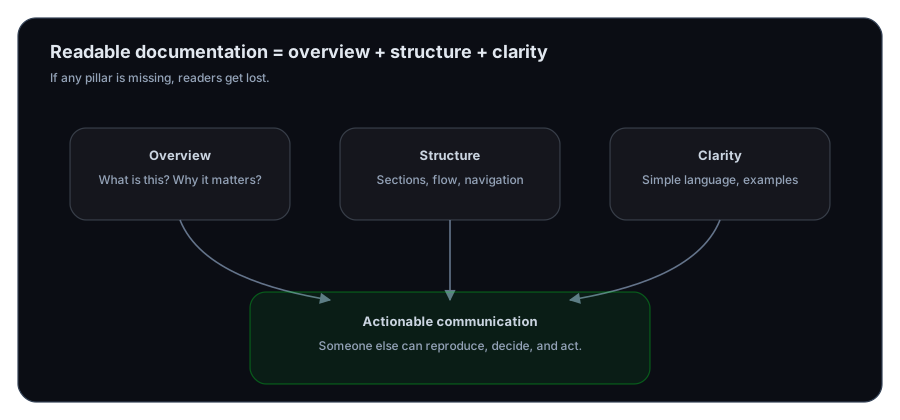
Effective documentation shares three core attributes:
1. Overview
Readers need to grasp the big picture immediately. What's the document about? What will they find in it? What's the key takeaway?
An overview acts as a navigation system. Readers know where they're going and what to expect.
2. Structure
Information organized logically is readable. Information scattered randomly is confusing.
Structure means:
- Clear sections with meaningful headers
- Logical flow from one idea to the next
- Related information grouped together
- Navigation aids (table of contents, page numbers, references)
3. Clarity
Ambiguous writing creates confusion. Repetitive writing wastes time. Technical jargon without explanation alienates readers.
Clarity means:
- Simple language (explain technical terms)
- Active voice (clear agency)
- Specific examples (not generalizations)
- Concise sentences (one idea per sentence when possible)
Information Processing: From Chaos to Order
As you work through security challenges, you'll encounter massive amounts of information. Notes. Findings. Tool outputs. Research. Screenshots. Code snippets.
This chaos needs transformation. Raw data becomes useful only through organization.
Documentation is your tool for this transformation. As you write, you:
- Process the information yourself
- Identify what matters and what doesn't
- Recognize patterns
- Connect concepts
- Create understanding
This is why documentation isn't a final step — it's part of learning itself.
Tools for Documentation
Several tools help manage the complexity:
CherryTree is a note-taking application designed for organizing hierarchical information. It's particularly useful for security work because you can:
- Organize notes in a tree structure (main topics with subtopics)
- Include rich text formatting
- Embed images and code
- Search across all notes
- Export to various formats
For visual documentation, screenshots are essential. A picture truly is worth a thousand words. But raw screenshots are often useless — they need context and annotation.
FlameShot is a screenshot tool that lets you:
- Capture specific areas of your screen
- Annotate directly (draw boxes, arrows, text)
- Highlight important details
- Export in multiple formats
- Quick sharing and editing
Screenshots with annotations transform vague descriptions into clear evidence.
Annotated screenshots = clarityDocumentation Guidelines
Regardless of your audience, follow these principles:
1. Adopt the Reader's Perspective
Before writing, put yourself in your reader's position. What would confuse them? What context do they need? What assumptions are you making?
If you're documenting for a technical audience, they understand protocols and exploit chains. If documenting for management, they care about risk and impact, not technical details.
If you're documenting for yourself later, remember that "future you" will have forgotten your current context. Write for someone unfamiliar with your work.
2. Eliminate Repetition and Ambiguity
Repetition wastes readers' time. If you've stated something once clearly, don't state it again.
Ambiguity creates confusion. Avoid phrases like:
- "It might work"
- "Probably, if conditions are right"
- "Depending on various factors"
Be specific: "This vulnerability exists because..." or "This technique requires X and Y."
3. Prioritize Readability
No one enjoys reading documentation that's difficult to follow. Make it easy:
- Use headers to break up text
- Keep paragraphs short
- Use lists for related points
- Add visual breaks (whitespace)
- Include relevant screenshots
- Link to resources
Difficult reading actively discourages engagement. Readers will skip important information just to avoid the cognitive burden.
warning
Documentation that's hard to read is often ignored, misunderstood, or abandoned. Invest in clarity. Your future self and your readers will thank you.
Audience-Specific Considerations
Documentation for Customers
Before documenting for a customer, clarify their priorities. A financial company cares about data breach impacts. A healthcare provider cares about HIPAA compliance. A tech startup cares about technical exploitability.
Your documentation should address their concerns directly.
Include:
- Executive summary (non-technical overview of findings and risk)
- Detailed technical findings (with proof-of-concept evidence)
- Risk assessment (business impact, not just technical severity)
- Remediation steps (specific, actionable recommendations)
- Timeline (what was done when)
Documentation for Yourself
When documenting your own learning and work:
Include:
- What you were trying to accomplish
- What you did and why
- What you discovered
- What confused you and how you resolved it
- Links to relevant resources
- Questions for later follow-up
This becomes your personal knowledge base — invaluable when you encounter similar situations later.
Internal Documentation
If you're part of a team:
Include:
- What was attempted
- What worked and what didn't
- Resource requirements
- Time spent
- Lessons learned
- Recommendations for team members attempting similar work
This helps others learn from your experience without repeating your mistakes.
The Process of Documentation
Documentation isn't separate from your work. It's integrated:
-
During work: Take notes as you go. Capture screenshots immediately. Record your thinking.
-
After work: Organize your raw notes. Fill in gaps. Add context.
-
For presentation: Tailor your documentation to your audience. Highlight relevant information. Create summary documents.
This three-stage process prevents information loss and ensures nothing important is forgotten.
What is the primary purpose of documentation?
Why should you determine your audience before documenting?
What are the three essential characteristics of effective documentation?
What does CherryTree help you accomplish?
Why is FlameShot useful for documentation?
What does it mean to adopt the reader's perspective when documenting?
Why should documentation eliminate repetition?
What makes documentation difficult to read?
Before documenting for a customer, what should you clarify?
What should customer-focused documentation include?
Exercise 1 — Create a reusable note template
Create a note template you’ll reuse for every lesson:
- Concept summary (5 bullets max)
- Commands/snippets (with context)
- Common failures + fixes
- 3 flashcards
Question 1 — Why does documentation beat “trusting your memory” in security?
Next Lesson
With documentation skills mastered, the next lesson teaches organization and systematic planning.
Next: Organization Systems