What Is Ransomware?
Imagine your most important files—documents, photos, financial records, patient data—suddenly becoming inaccessible. A message appears: "Your files have been encrypted. Send us money for the decryption key." You can't work. Your business can't operate. You're held hostage by your own data.
Ransomware is malicious software that encrypts a victim's files, making them inaccessible, then demands payment (ransom) in exchange for a decryption key. It's digital extortion—attackers hold data hostage until the victim pays.
Ransomware is profitable crime. Cybercriminals target individuals, small businesses, large enterprises, hospitals, utilities, and governments. The financial impact is staggering. Annual cybercrime costs are projected to exceed $10 trillion by 2025 according to industry estimates.
Unlike other malware that steals data or destroys systems, ransomware's purpose is explicitly financial. The attacker's goal is straightforward: extract money by exploiting the victim's dependence on their own data.
Key concept
For penetration testers: Understanding ransomware is critical for security assessments. You'll test whether backup systems are truly isolated (ransomware can't reach them), whether email security blocks malicious attachments, whether users recognize phishing, and whether recovery procedures actually work. Ransomware testing requires careful authorization and planning.
How Ransomware Attacks Unfold
Ransomware Attacks follow a predictable progression:
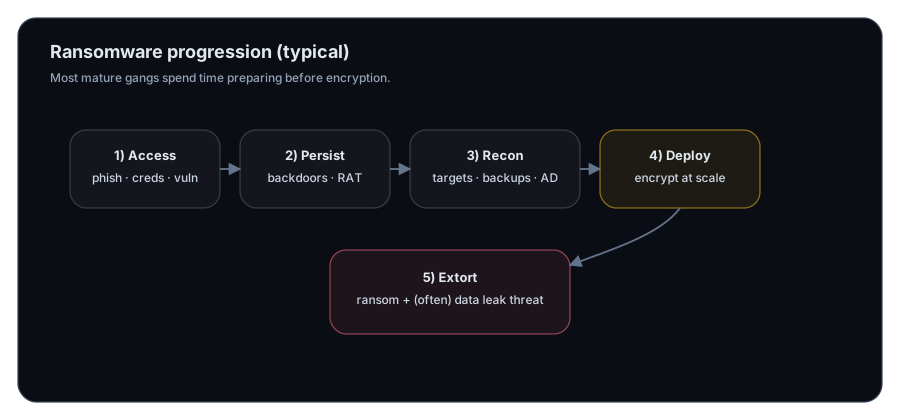
Stage 1: Initial Access
The attacker must first gain access to the victim's network. Common methods include:
Phishing Emails — Deceptive emails appearing to come from trusted sources (banks, colleagues, vendors) with malicious attachments or links. Users unknowingly download ransomware when they open attachments or click links.
Compromised Credentials — Attackers use stolen username and password combinations (from previous breaches) to log into systems directly.
Unpatched Vulnerabilities — Attackers exploit known security flaws in applications or operating systems that haven't been patched.
Weak Remote Access — Poorly secured remote access systems (RDP, VPN) with weak passwords allow unauthorized entry.
Supply Chain Compromise — Attackers compromise software vendors or service providers, distributing malware to many organizations at once.
Stage 2: Establishing Persistence
Once inside, attackers establish persistence—the ability to maintain access even if the initial entry point is closed.
Backdoors — Installing hidden access mechanisms so the attacker can return later.
Credential Theft — Stealing administrative credentials for future access.
Remote Access Tools — Installing legitimate-looking remote access software for future control.
This stage might take days or weeks. The attacker wants to ensure they can regain access if discovered.
Stage 3: Reconnaissance and Preparation
Before deploying ransomware, sophisticated attackers gather information:
Explore the network — Map systems, identify critical data, find backup locations.
Identify targets — Determine which files are most valuable (databases, financial records, intellectual property).
Disable defenses — Disrupt antivirus, backup systems, and security monitoring.
Locate backups — Find and encrypt backup systems so victims can't restore data.
This stage is critical. A well-prepared attacker knows exactly what they're encrypting and has disabled recovery options.
Stage 4: Ransomware Deployment
Once everything is ready, the attacker deploys ransomware to many systems simultaneously—often during off-hours or weekends when IT staff is unavailable.
Rapid encryption — The malware encrypts files across connected systems as quickly as possible.
File locking — Critical files become inaccessible. Database files, documents, backups—all encrypted.
Ransom message — A note appears on screens explaining the situation and providing payment instructions.
Countdown timer — Often includes a deadline ("Pay in 48 hours or we delete the key").
Stage 5: Extortion and Negotiation
The attacker contacts the victim, often providing "proof" they have the data by decrypting a sample file. They demand payment, usually in cryptocurrency (Bitcoin, Monero) to preserve anonymity.
Victims face a terrible choice: pay money with no guarantee of recovery, or refuse and lose the data.
Some sophisticated attackers add a new threat: "Pay or we'll sell your stolen data online." This compounds the damage—it's not just encryption, but data breach and public exposure.
The WannaCry Case Study
In May 2017, a ransomware attack called WannaCry spread rapidly across the globe, infecting over 200,000 computers in more than 150 countries. It became one of the most devastating ransomware attacks in history.
How it spread:
- Exploited a Windows vulnerability (EternalBlue) that Microsoft had patched months earlier
- Spread worm-like to unpatched systems without requiring user interaction
- Affected computers in hospitals, businesses, governments, and public services
The impact:
- UK National Health Service hospitals were severely disrupted. Staff couldn't access patient records, surgeries were canceled, ambulances were diverted to other hospitals
- Manufacturing plants shut down production lines
- Government agencies lost operational capacity
- Businesses worldwide experienced downtime and data loss
- Ransoms demanded: $300-$600 per infected system in Bitcoin
Estimated damage: Billions of dollars globally, but incalculable in terms of disrupted healthcare, lost productivity, and compromised systems.
Key lesson: WannaCry targeted organizations that hadn't applied security patches. It demonstrated that attackers exploit laziness and complacency—organizations skip updates thinking "it won't happen to us."
Impacts of Ransomware
Ransomware doesn't just cost money. Its effects ripple across organizations and society:
Operational Shutdowns
When ransomware encrypts critical files, operations cease. A manufacturing plant can't run. A hospital can't process patient records. A bank can't process transactions. Every moment of downtime costs money and damages service.
Example impact: A hospital with ransomware-encrypted patient records must divert emergency patients to other facilities, cancel surgeries, and operate without historical patient information—potentially endangering lives.
Financial Losses
Ransom payment — Attackers demand thousands to millions of dollars.
Downtime costs — Every hour a business is offline, it loses revenue. For 24/7 operations like hospitals or utilities, downtime is catastrophic.
Recovery costs — Rebuilding systems, restoring from backups, implementing new security measures, and hiring incident response teams costs substantial money.
Regulatory fines — Organizations that fail to protect data face legal penalties.
Insurance claims — Cyber insurance premiums increase after attacks.
A single ransomware attack can cost millions in direct and indirect expenses.
Data Loss
If backups are also encrypted or destroyed, victims face permanent data loss. Years of financial records, research, customer data, or historical information may be irrecoverably gone.
Some variants specifically target backup systems, ensuring victims can't simply restore from backup.
Reputational Damage
Public knowledge of a ransomware attack damages trust. Customers worry their data was compromised. Investors lose confidence. Competitors gain market share. The reputation damage often exceeds the direct financial loss.
Perpetuation of Cybercrime
Paying ransoms encourages attackers to continue. Victims who pay become targets for future attacks. Organizations that pay mark themselves as profitable victims, attracting more criminals.
Some estimates suggest that 50-70% of organizations pay ransoms, perpetuating a cycle that costs society trillions annually.
Cascading Impacts
Ransomware affecting critical infrastructure affects everyone dependent on those services:
- Ransomware at a port disrupts global shipping
- Ransomware at a utility affects power supply
- Ransomware at a hospital network affects patient care across a region
- Ransomware at a software vendor affects all customers
The impact isn't localized to the attacked organization.
Ransomware Variants and Evolution
Ransomware has evolved significantly:
Early Ransomware
Early variants were unsophisticated, targeting individuals with small ransom demands ($100-$500). Detection and removal were often possible.
Modern Ransomware (Ransomware-as-a-Service)
Modern ransomware is highly professional. Criminal organizations offer "Ransomware-as-a-Service" (RaaS)—they maintain the infrastructure, handle negotiations, and split profits with affiliates who deploy the malware. This makes ransomware accessible to less-technical criminals.
Double Extortion
Sophisticated attackers steal data before encrypting it. They encrypt the data (impact 1) and threaten to sell or publicly release stolen data (impact 2). This applies pressure even to organizations with good backups—paying avoids public data exposure.
Advanced Targeted Ransomware
Recent attacks target large organizations specifically:
- Extensive reconnaissance before attack
- Careful timing to maximize damage (encrypt during weekend when IT staff is unavailable)
- Disabling backup systems in advance
- Demanding millions in ransom from well-funded organizations
- Negotiating like professional criminals
Defense Against Ransomware
Organizations defend Against Ransomware through multiple layers:
Prevention
Email Security — Detect and block phishing emails containing ransomware. Spam filters, attachment scanning, and link analysis help.
Endpoint Protection — Antivirus, anti-malware, and behavioral analysis on computers detect ransomware execution.
Patch Management — Regularly apply security updates to operating systems and applications, closing vulnerabilities attackers exploit.
Access Control — Restrict who can access critical systems. Disable unnecessary remote access. Require strong authentication.
User Training — Educate employees about phishing, social engineering, and suspicious attachments. User awareness prevents many infections.
Detection
Monitoring — Monitor file systems for unusual encryption activity. Legitimate programs don't typically encrypt thousands of files simultaneously.
Behavioral Detection — Identify malware behaviors (rapid file access, encryption, privilege escalation) even if signatures don't match known ransomware.
Network Monitoring — Detect ransomware communicating with attacker infrastructure.
Response
Incident Response Plan — Document procedures for ransomware incidents. Who gets notified? When do you isolate infected systems? How do you communicate with stakeholders?
Isolation — Quickly isolate infected systems to prevent ransomware spread.
Backup Recovery — Restore from clean backups if available. This is often the only reliable recovery method.
Forensics — Determine how the attack occurred and what was compromised.
Recovery (The Most Important Layer)
Isolated Backups — Maintain offline, air-gapped backups that ransomware can't reach. Even if systems are encrypted, backups allow recovery.
Regular Testing — Periodically test backup restoration to ensure backups are clean and restoration works.
Redundancy — Maintain multiple backup copies so one compromise doesn't eliminate all recovery options.
Organizations with robust backup and recovery procedures survive ransomware attacks. Those without suffer permanent data loss or are forced to pay ransoms.
The Ransomware Reality
Ransomware is now among the costliest cybersecurity threats. Government agencies, private companies, hospitals, and critical infrastructure face constant ransomware threats.
Key realities:
- Prevalence — Ransomware attacks occur daily against thousands of organizations
- Cost — A single attack can cost millions; annual costs are in the trillions
- Severity — Attacks target critical sectors (healthcare, utilities, government) with cascading impacts
- Evolution — Attacks are becoming more sophisticated and targeted
- Sustainability — Ransomware will continue as long as victims pay
The most important ransomware defense isn't paying attackers. It's preventing infection through security hygiene and ensuring recovery through isolated backups.
What is Ransomware?
What are common initial access methods for ransomware?
What is persistence in ransomware attacks?
What is the purpose of the reconnaissance stage in ransomware attacks?
What was WannaCry and what made it so devastating?
What is double extortion in ransomware attacks?
What is Ransomware-as-a-Service (RaaS)?
Why shouldn't organizations always pay ransoms?
What are isolated backups and why are they critical?
What are cascading impacts of ransomware on critical infrastructure?
Exercise 1 — Draft a ransomware response checklist
Write a short response checklist with:
- First 3 containment actions
- First 3 investigation actions
- Two recovery actions
- One communication action
Question 1 — Why do backups sometimes fail during ransomware incidents?
Next Lesson
Now that you understand ransom-based encryption attacks, it's time to explore social engineering—attacks that manipulate people rather than systems.
Next: Social Engineering Tactics