The Foundation of All Security Work
Information Security doesn't operate randomly. Instead, it's built on a set of fundamental principles that guide how organizations protect their data, systems, and people. These principles are universal—they apply whether you're a security leader setting strategy, a defender monitoring systems, or a penetration tester identifying weaknesses.
Understanding these principles is not optional. They form the theoretical backbone that informs practical decisions. When you know why a control exists, you can better evaluate how to test it, bypass it ethically, and ultimately strengthen it.
These principles shape everything: how systems are designed, what policies organizations create, how incidents are handled, and even the legal standards that govern technology use.
The Six Core Principles
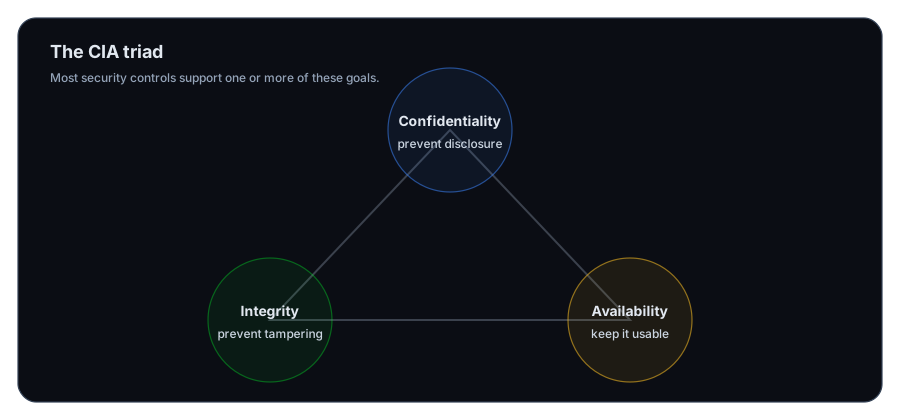
Confidentiality: Keeping Secrets Secret
Confidentiality means that information remains accessible only to people who are authorized to see it. It protects against unauthorized disclosure—the exposure of sensitive data to those who shouldn't have it.
Imagine a patient's medical records. They contain information meant only for that patient, their doctors, and authorized healthcare staff. If a hacker accesses those records, confidentiality has been breached.
Organizations implement confidentiality through:
- Encryption: Scrambling data so only authorized parties with the correct key can read it
- Access controls: Restricting who can view specific files, folders, or systems
- Data classification: Labeling information by sensitivity level and handling it accordingly
Key concept
For penetration testers: One of your key objectives is testing whether confidentiality controls actually work. Can you access data you shouldn't be able to see? If yes, confidentiality is broken.
Integrity: Ensuring Data Hasn't Changed
Integrity assures that data remains accurate and complete throughout its entire lifecycle. It protects against unauthorized modification—someone changing, deleting, or corrupting data without permission.
Consider a bank transaction. If $1,000 is transferred and the amount secretly changes to $10,000 in transit, the data's integrity has been compromised. The recipient received the wrong information.
Organizations protect integrity through:
- Hashing: Creating a digital fingerprint of data that changes if the data is modified even slightly
- Digital signatures: Cryptographically signing documents to prove they haven't been altered
- Change controls: Requiring approval before modifications to critical systems
- Checksums: Verifying that transmitted data arrived unchanged
Availability: Information When You Need It
Availability ensures that authorized users can access information and systems when they need them. It protects against disruption—hackers blocking access or systems failing unexpectedly.
A business website that goes offline for hours loses availability. Customers can't shop, revenue stops, and trust erodes. A hospital unable to access patient records during a cyberattack faces a critical availability failure.
Organizations maintain availability through:
- Redundancy: Running backup systems so if one fails, others take over
- Disaster recovery planning: Procedures to restore systems quickly after incidents
- Load balancing: Distributing traffic so no single server gets overwhelmed
- Regular maintenance: Keeping systems up-to-date and healthy
Note: Confidentiality, Integrity, and Availability together form the CIA Triad—the three pillars of information security. All security measures ultimately support one or more of these goals.
Authentication: Proving You Are Who You Claim
Authentication verifies the identity of a user, process, or device before granting access to resources. It answers the question: "Are you really who you say you are?"
Without authentication, anyone could pretend to be you. They could access your email, steal your data, or perform actions in your name.
Common authentication methods include:
- Passwords: Something you know
- Biometrics: Something you are (fingerprints, facial recognition)
- Multi-factor authentication (MFA): Combining multiple verification methods (password + phone code + security key)
- Digital certificates: Proving identity through cryptographic proof
The stronger the authentication, the harder it is for attackers to impersonate legitimate users.
Non-repudiation: Creating Accountability
Non-repudiation ensures that someone cannot deny they performed an action. If you sent a message or signed a document, there's proof you did it.
This principle is critical in legal and financial contexts. A person who signs a contract cannot later claim they didn't sign it. An employee who made a transaction can be held accountable.
Non-repudiation is implemented through:
- Digital signatures: Cryptographic proof that a specific person signed something
- Audit logs: Detailed records of who did what and when
- Timestamps: Proving when an action occurred
- Chain of custody: Documenting how evidence has been handled in investigations
Privacy: Respecting Personal Information
Privacy focuses on the proper handling of sensitive personal information. It's about respecting individuals' rights to control their own data and ensuring organizations follow data protection laws.
Privacy is regulated by strict laws like GDPR (Europe), CCPA (California), and others. Organizations must:
- Minimize data collection: Only gather information actually needed
- Obtain consent: Ask permission before using personal data
- Provide transparency: Tell people how their data will be used
- Enable control: Let individuals access, modify, or delete their data
- Secure personal data: Protect it from unauthorized access
Unlike confidentiality (which protects all sensitive data), privacy specifically addresses personal information and individuals' rights.
The Processes That Implement These Principles
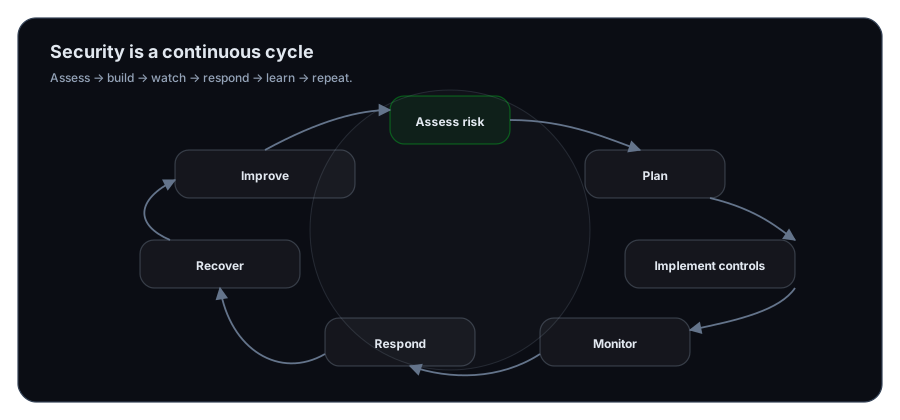
Principles alone don't protect data. Organizations use structured Processes to turn principles into reality:
Risk Assessment
Every organization faces threats. Risk assessment identifies what could go wrong, how likely it is, and what the impact would be. This process determines which security efforts matter most.
Security Planning
Once risks are identified, organizations develop strategies to address them. This creates policies, procedures, and resource allocation decisions that guide all future security work.
Implementation of Security Controls
Plans become real through controls. Some prevent attacks from succeeding (preventive controls). Others detect attacks in progress (detective controls). Both types are essential.
Monitoring and Detection
Security isn't a one-time effort. Organizations continuously watch for suspicious activity using tools like:
- SIEM systems (Security Information and Event Management): Collect and analyze security events across all systems
- Intrusion Detection Systems (IDS): Monitor network traffic for attack patterns
- Automated alerts: Flag suspicious behavior in real-time
Incident Response
When an attack happens, a trained team springs into action. They contain the damage, remove the attacker, restore systems, and investigate what went wrong.
Disaster Recovery
For major incidents, recovery protocols ensure business continuity. Backup systems take over, data is restored, and operations resume as quickly as possible.
Continuous Improvement
Security is never "done." Organizations review past incidents, test new threats, audit their controls, and update defenses based on lessons learned and emerging dangers.
Why Organizations Do All This: The Purpose of InfoSec
Understanding Why Organizations invest in security helps you understand what you're protecting and why it matters:
Protecting Sensitive Data — Personal information, financial records, trade secrets, and proprietary research are valuable targets. A breach exposes organizations to lawsuits, regulatory fines, and competitive harm.
Ensuring Business Continuity — When systems go down, businesses lose revenue and customers. Security measures keep critical operations running even during attacks or disasters.
Maintaining Regulatory Compliance — Laws like GDPR, HIPAA, and SOC 2 require organizations to protect data and demonstrate it. Non-compliance brings fines and legal consequences.
Preserving Brand Reputation — A major breach damages customer trust and brand value. Strong security demonstrates commitment to protecting stakeholders.
Safeguarding Intellectual Property — A company's innovations, designs, and creative works are competitive advantages. Protecting them prevents theft and maintains market position.
Enabling Safe Digital Transformation — As organizations adopt new technologies, security must evolve alongside them. Good security practices allow innovation without reckless risk.
Common Tools of Information Security
InfoSec professionals rely on Tools to detect, prevent, and respond to threats. As a penetration tester, you'll encounter and eventually use many of these:
| Tool Category | Purpose | Examples |
|---|---|---|
| Firewalls | Control network traffic in and out | Palo Alto, Cisco ASA |
| IDS/IPS | Detect and block suspicious network activity | Suricata, Snort |
| SIEM | Aggregate and analyze security events | Splunk, ELK Stack |
| Vulnerability Scanners | Automatically find weaknesses in systems | Nessus, OpenVAS |
| Encryption Tools | Protect data confidentiality and integrity | GPG, BitLocker, TLS/SSL |
| Access Control Systems | Manage user permissions and authentication | Active Directory, Okta |
Tools for Penetration Testing
As you develop your penetration testing career, you'll become proficient with specialized tools:
- Nmap: Discovers devices and services on networks
- Wireshark: Captures and analyzes network traffic
- Metasploit: Framework for developing and executing exploits
- Burp Suite: Tests web application security
- John the Ripper: Cracks weak passwords
- Operating Systems: Linux, Windows, and macOS for different testing scenarios
Key concept
Critical reminder: These tools are powerful and can cause real damage. Using them without explicit authorization is illegal. Always ensure you have written permission before testing any system that doesn't belong to you.
Putting It All Together
The principles you've learned in this lesson—Confidentiality, Integrity, Availability, Authentication, Non-repudiation, and Privacy—are not abstract concepts. They guide every decision an organization makes about protecting its data.
When you test a system as a penetration tester, you're evaluating whether these principles are actually implemented. Can someone access data they shouldn't (confidentiality failure)? Can they modify records without detection (integrity failure)? Can they disrupt access (availability failure)? These are the questions driving your work.
The processes—risk assessment, planning, implementation, monitoring, response, recovery, improvement—form the continuous cycle that keeps systems secure over time.
And the tools you'll learn are the practical instruments for executing that work.
What does Confidentiality protect against?
How does Integrity differ from Confidentiality?
What is the CIA Triad?
What does Authentication verify?
Why is Non-repudiation important in legal contexts?
How does Privacy differ from Confidentiality?
Name three security processes that implement these principles.
What is the purpose of a SIEM system?
Why must penetration testing tools only be used with authorization?
How does Disaster Recovery support Availability?
Exercise 1 — Apply CIA to a real system
Choose one system (email, GitHub repo, personal laptop, small web app) and write:
- One Confidentiality risk + one control
- One Integrity risk + one control
- One Availability risk + one control
Question 1 — Why do security controls often involve trade-offs between CIA goals?
Next Lesson
Now that you understand the principles and processes that guide security work, it's time to explore how networks are protected from threats.
Next: Network Security Fundamentals