Why Cloud Security Is Different
Organizations increasingly store data and run applications in the Cloud—whether public clouds like AWS and Azure, private clouds within their own infrastructure, or hybrid environments mixing both. This shift brings efficiency and scalability, but it also changes how Security works.
Cloud Security is the practice of protecting data, applications, and infrastructure in cloud environments. It's different from traditional security because you don't own the infrastructure. You're sharing a cloud provider's systems with other organizations, which introduces new risks and requires new thinking.
A critical principle distinguishes cloud security from on-premises security: shared responsibility. You don't fully control your security environment. The cloud provider controls some parts; you control others. Understanding this boundary is essential.
Key concept
For penetration testers: Cloud security testing requires understanding both shared responsibility boundaries and cloud-specific vulnerabilities. You may be testing your organization's cloud configuration, cloud provider APIs, identity and access controls, or data isolation. Cloud environments offer both greater complexity and greater visibility into security controls.
The Shared Responsibility Model
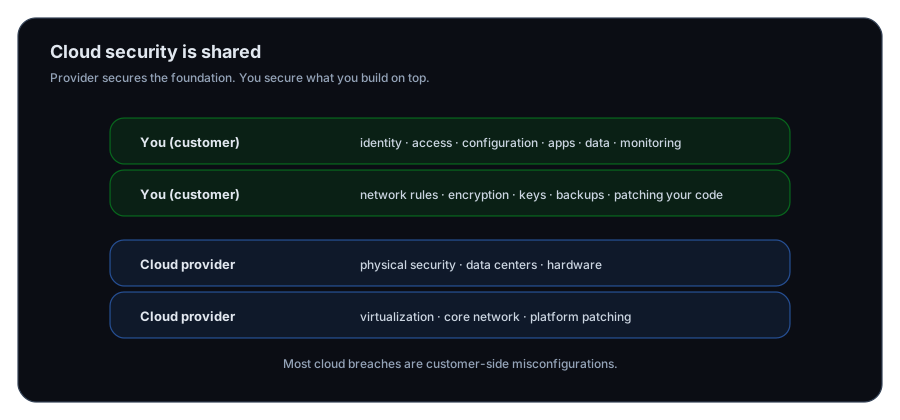
The cloud provider isn't responsible for all security, and you aren't responsible for all security. The Responsibility is Shared—and misunderstanding where the line is drawn is a common cause of breaches.
What the Cloud Provider Secures
The cloud provider secures the infrastructure:
- Physical security — Guards, locked data centers, surveillance cameras, and controlled access to facilities
- Network infrastructure — Secure routing, DDoS protection, and network segmentation between customers
- Virtualization — Isolating your virtual machines from other customers' machines
- Hardware — Secure servers, storage systems, and backup systems
- Compliance with regulations — Meeting legal standards for data protection
- Patch management for infrastructure — Updating the cloud platform itself
The provider's job is to ensure the foundation is secure so you can safely build on top of it.
What You Secure
You secure everything running on top of that infrastructure:
- Data classification and encryption — Deciding what data is sensitive and encrypting it
- Access control — Managing who can access your data and applications
- User authentication — Passwords, multi-factor authentication, identity management
- Configuration — Properly configuring cloud services (not accidentally exposing storage buckets to the internet)
- Application security — Secure code, secure deployment of applications
- Network configuration — Firewalls, security groups, private networks
- Monitoring and logging — Detecting suspicious activity in your own applications and data
- Patch management for applications — Updating applications you deploy
- Employee training — Teaching your staff about security best practices in cloud environments
This is a lot of responsibility. Many organizations underestimate this, assuming the cloud provider handles all security.
Where Misunderstanding Leads to Breaches
A common scenario: An organization stores customer data in a cloud storage bucket and misconfigures access controls, thinking the cloud provider's security means the data is automatically protected. But the cloud provider's security is about preventing other customers from accessing your data—it's not about preventing you from accidentally exposing your own data. The organization accidentally makes the bucket public, exposing millions of customer records.
Another example: An organization assumes the cloud provider updates and patches all applications. But the cloud provider only patches the infrastructure. Applications deployed on the cloud are the organization's responsibility. When a critical vulnerability is announced, the organization isn't aware and doesn't patch, leaving systems vulnerable.
These aren't cloud provider failures. They're failures to understand shared responsibility.
Key Areas of Cloud Security
Data Protection: Encryption and Safeguards
Data exists in two states: at rest (stored on servers) and in transit (moving across networks). Both must be protected.
Encryption at Rest — Data stored in cloud services should be encrypted so that even if someone gains unauthorized access to the storage system, they read only scrambled data. Encryption keys should be managed securely, separate from the encrypted data.
Encryption in Transit — Data moving to and from cloud services should be encrypted using protocols like TLS/SSL. Unencrypted communication can be intercepted.
Key Management — Encryption is useless if the encryption keys are compromised or lost. Organizations must securely manage keys: storing them safely, rotating them periodically, and controlling who can access them.
Data Classification — Not all data requires the same protection. Classify data by sensitivity:
- Public — Marketing materials, product information
- Internal — Employee policies, internal communications
- Confidential — Customer data, financial records
- Secret — Trade secrets, legal strategy
Classification guides encryption decisions and access control policies.
Identity and Access Management (IAM)
In the cloud, identity management is critical. You can't physically lock a door; you control access through digital identity and access control systems.
User Authentication — Verifying that users are who they claim. Cloud IAM supports:
- Passwords
- Multi-factor authentication (MFA)
- Single sign-on (SSO)
- Federated identity (using external identity providers)
Authorization and Permissions — Determining what authenticated users can do. Cloud IAM uses role-based access control:
- Admin role (full access)
- Developer role (can deploy and modify applications)
- Viewer role (read-only access)
- Custom roles (fine-grained permissions)
Service Accounts and Keys — Applications and services need access to cloud resources. Service accounts are identities for these applications, separate from human user accounts. API keys and tokens grant these accounts access.
Access Reviews — Permissions change as roles change. Regular reviews ensure users have appropriate access:
- New hires need initial access
- Promotions change access needs
- Departing employees need immediate revocation
- Role changes require permission updates
Weak IAM is a common vulnerability. Overly permissive access, shared credentials, and stale permissions create exposure.
Network Security in the Cloud
Your cloud environment exists within a virtual network. You control connectivity, routing, and traffic filtering.
Virtual Networks — Cloud providers offer virtual private networks (VNets/VPCs) where you define network topology and connectivity. You can isolate applications from the internet using private subnets.
Security Groups and Network ACLs — Firewalls for cloud resources. You define rules:
- Allow HTTP traffic to web servers from the internet
- Allow database traffic only from application servers
- Block all other traffic
VPNs and Encryption — Secure connectivity between your on-premises network and cloud resources, encrypting all traffic.
DDoS Protection — Cloud providers offer DDoS mitigation, but you configure thresholds and responses. Some attacks require custom rules you define.
Network Segmentation — Separating applications and data by network so a breach in one area doesn't compromise everything. A web application shouldn't have direct network access to a sensitive database.
Compliance and Governance
Cloud environments must comply with regulations relevant to your industry and data.
Data Residency — Some regulations require data to remain in specific geographic regions. Cloud providers offer region selection; you must choose appropriately.
Data Privacy Regulations — GDPR, CCPA, HIPAA, and others impose requirements on how personal and sensitive data is handled. Cloud deployments must respect these.
Audit and Logging — Regulations often require detailed logs of who accessed what data and when. Cloud environments must have comprehensive logging enabled.
Security Certifications — Cloud providers obtain certifications (ISO 27001, SOC 2, PCI DSS) demonstrating they meet security standards. Verify that your cloud provider has certifications relevant to your compliance requirements.
Compliance Responsibility — Here's another shared responsibility boundary: the cloud provider ensures the infrastructure can be compliant, but you must configure it correctly and maintain evidence of compliance.
Common Cloud Security Threats
Understanding Cloud-specific threats helps guide Security decisions.
Misconfiguration
Cloud services are powerful and flexible. That flexibility creates risk. A single misconfigured setting can expose sensitive data to the internet. Examples:
- Storage buckets with public read access when they should be private
- Databases with security groups allowing internet access
- Encryption disabled when it should be enabled
- Default credentials not changed
Misconfiguration is the #1 cause of cloud data breaches. It's often not a sophisticated attack—just an accident.
Identity and Access Compromise
If an attacker gains valid credentials (through phishing, weak passwords, or credential theft), they can access your cloud resources as if they were an authorized user. Without other controls, they can:
- Access sensitive data
- Modify or delete data
- Deploy malicious applications
- Create new administrative accounts for persistence
Strong authentication (MFA), monitoring for unusual access patterns, and least-privilege access reduce this risk.
Insecure APIs
Cloud services communicate through APIs (Application Programming Interfaces). Insecure APIs can be exploited:
- Unencrypted APIs leak data in transit
- APIs without authentication allow unauthorized access
- APIs with overly broad permissions enable escalation
- APIs missing rate limiting enable abuse
Data Exposure in Transit
Data moving between your organization and cloud services, or between cloud services, can be intercepted if not encrypted. TLS/SSL encryption protects data in transit.
Inadequate Logging and Monitoring
If you don't log and monitor activity in your cloud environment, you won't detect breaches. Attackers can operate undetected, stealing data or pivoting to other systems.
Account Hijacking
If an attacker compromises a cloud account (through credential theft or phishing), they can impersonate the legitimate user, accessing all their data and permissions. MFA and security monitoring help detect and prevent this.
Cloud-Specific Security Challenges
Visibility
With on-premises infrastructure, you see everything. Cloud infrastructure is managed by the provider. Visibility into network traffic, system configurations, and provider actions is limited. You must use cloud provider monitoring and logging tools to understand what's happening.
Complexity
Cloud environments can grow complex quickly: multiple services, many configuration options, numerous integrations. Complexity creates hidden vulnerabilities. Regular audits and security assessments are essential.
Rapid Change
Cloud environments change constantly: new services deployed, configurations modified, policies updated. Security must keep pace. Automated security scanning and continuous monitoring help catch misconfigurations before they cause problems.
Shared Responsibility Confusion
As discussed, misunderstanding who's responsible for what is a common problem. Clear documentation and training prevent gaps.
Testing Cloud Security
Penetration testers verify that Cloud Security is effective.
Configuration Testing — Are cloud services configured securely? Can you find misconfigured public buckets, overly permissive security groups, or disabled encryption?
Identity Testing — Can you compromise accounts through weak authentication? Can you escalate privileges? Can you create persistent access?
API Testing — Are APIs properly secured and authenticated? Can you enumerate or abuse them?
Data Access Testing — Can you access data you shouldn't be able to reach?
Monitoring Testing — Can you detect unauthorized access? Are logs adequate?
Compliance Testing — Are configurations meeting regulatory requirements?
Cloud testing is similar to on-premises testing but requires familiarity with cloud platforms (AWS, Azure, Google Cloud) and their specific security models.
Key concept
For penetration testers: Cloud security testing is a growing specialty. Understanding cloud architecture, shared responsibility, identity models, and cloud-native tools is increasingly valuable.
Organizational Responsibility for Cloud Security
Cloud Provider — Secures infrastructure, provides Security tools and capabilities, maintains certifications, and provides visibility into their operations.
Cloud Architect/Administrator — Designs secure cloud architecture, configures services securely, implements IAM policies, and ensures compliance.
Security Team — Develops cloud security policies, performs assessments, monitors for threats, and responds to incidents.
Application Teams — Deploy applications securely, implement secure code practices, and operate applications according to security policies.
All Employees — Use cloud services securely, protect credentials, report suspicious activity, and complete security training.
Effective cloud security requires coordination across these roles. Gaps in any area create vulnerability.
Cloud Security Is Continuous
Cloud environments constantly change. New services are adopted, configurations are modified, threats evolve, and regulations update. Cloud Security must be continuous:
- Regular configuration audits — Verify nothing has drifted from secure baselines
- Ongoing threat monitoring — Detect suspicious activity
- Periodic penetration testing — Find vulnerabilities before attackers do
- Staying informed — Track security announcements and best practices
- Updating policies and controls — Adapt to new threats and services
- Employee training — Keep staff informed about cloud security best practices
Organizations that treat cloud security as a once-done project will eventually be compromised. Those that maintain continuous vigilance stay secure.
What is the shared responsibility model in cloud security?
What is the most common cause of cloud data breaches?
What are the two states of data that must be protected?
What is the purpose of Identity and Access Management (IAM) in cloud security?
What is role-based access control and why is it important?
Why is data classification important in cloud security?
What does network segmentation accomplish in cloud environments?
How can an attacker exploit a compromised cloud account?
Why is comprehensive logging and monitoring critical in cloud security?
How does cloud security differ from on-premises security?
Exercise 1 — Apply the shared responsibility model
For a cloud-hosted web app, list 5 responsibilities that are typically:
- The cloud provider’s responsibility
- The customer’s responsibility
Question 1 — Why are cloud misconfigurations such a common cause of breaches?
Next Lesson
Now that you understand cloud security, it's time to explore how mobile devices and their data are protected in today's BYOD world.
Next: Mobile Device Security Foundations